Healthcare Reform

Originally written Feb 20, 2011:

Ever tried to lose 70 pounds? It’s tough. I’m sure everyone has heard of The Biggest Looser by now. Every week – with a few exceptions –  the contestants inspire me.  At my worst in 2009, I tipped the scale at right about 300 pounds. In 2010 I worked my way down to 257 but then events in my life overcame my resolve to exercise and I gave up. I slowly worked my way back up to 277.

Enter 2011. Two hundred seventy seven pounds  is a long way from where I need to be.  So… For the last month I have walked a 5K every day on my treadmill. In addition I have being doing weight training every day. Additionally I have reduced my caloric intake to about 2250 calories a day. The net result: thus far I have lost about three pounds each week.  As I write this I currently weigh 265lbs.

Weight loss is about one thing: Using more calories than you consume (“types” of calories is a topic best left for a conversation on health- this post is about intake vs. consumption). Here’s my  math. Someone my starting size (277lbs, 6′ 4″) has a resting (basal) metabolic rate of about 2200. And during the course of my day (7 hours sleeping, 17 awake, super light activity) I burn about 1000 additional calories. Therefore,  my total daily burn is probably somewhere around 3200 (that’s to maintain my current weight). To lose a pound you need to burn roughly 3500 calories. So, over the course of each day I eat (on average) 2250 calories, burn about 700 (exercise) and I have a deficit of 1650. Over the course of a week my deficit total is somewhere around 11,000 and 11,000/3500 = 3-ish lbs lost each week.

There are obvious cardio benefits too. I timed myself in the beginning of my journey. It took me more than 11 mins to puff my way through a mile. Now I can run a mile in under 9 mins (sans puffing). My 5K time was 39 mins and now I can run it just shy of 32 mins. My goal for my birthday is a sub 8 minute mile and a sub 30 min 5K. The body’s ability to heal itself is fantastic.

Update written March 15, 2011:

By the beginning of March I was down to 257 again. I ran a mile in 8 mins 10 seconds and a 5K in 29 mins. I had high hopes for reaching the 240’s by my birthday (March 22nd).

And then the shin splints came. I’m not exactly certain why they started. Possibly bad running form, the increased workout intensity or the fact that I changed shoes (wore my other pair out!). The pain got so bad I could barely walk, let alone run.

But I was determined not to give up this time. I changed my walking technique to compensate for the pain and I adjusted the treadmill incline to maintain the workout intensity. There were days I simply had to skip. Around the same time work and home life got particularly stressful (sorry, no juicy details) and I compromised my diet at times. While there was no further weight loss, I was able to maintain my progress.

Fast forward two weeks. Today I was finally able to run again without pain. I jogged about six miles while I watched the part of the bachelor finale on Hulu. It felt so good to run again! I don’t have any residual pain after my run, so I’m feeling hopeful. It’s back to my diet and regular workout now.

I’ll post another update sometime in April. My new goal is to hit the 240’s by April 10th, since my original plan hit a snag. Wish me luck!


Just Plugging My Companies!

At BladeHQ we recently created a content & marketing department. I think this effort is critical to our success. Some of the most important elements attached this expected success are, sadly, proprietary. As much as I would love to discuss everything it will have to wait indefinitely. Suffice it to say, marketing revolves around the idea of being mentioned. The more places you’re mentioned the better.

And so it is with pleasure that I mention my companies on my personal blog. I’ll just spotlight one every month or so until I run out…

BladeHQ.com was started back in 2003 as a spin off of my first company, BladePlay.com. It’s purpose was to sell higher end knives and gear it’s marketing more toward professionals and collectors. Initially we had limited success because we lacked a “brick and mortal” retail store (a requirement imposed by many knife manufacturers). We opened our first “store” late in 2003 and started carrying name brand knives on our website. With careful planning and some luck our web store continued to grow even through the recent recessions.

With unparalleled in stock availability, top tier customer service and unmatched value we have become one of the largest knife retail companies in the world. We specialize in military, police and collectible knives. We carry brands including Spyderco Knives, Protech Knives, Microtech Knives, Kershaw Knives, CRKT Knives, TOPS Knives, SOG Knives, Benchmade Knives. We’ve got folding knives, spring assisted knives, butterfly knives, and everything else in between.

Our growth has allowed us to expand and in more recent years we have expanded our offerings to include more niche items such as survival gear, outdoor equipment, watches and even clothing. 2011 has started off super and we have some exciting plans for the coming months.

Say What?

Say What? The Story of Tim.

“I’m going to go out today” Tim’s Mom said. “Do you want to come with me?”
“Yes, I’d like to go with you” said Tim. “I have a feeling today will be a fun day.”

Timmy’s mom stopped at the Butcher’s store first. Tim looked over the counter and said, “Why do you need a knife that big?”
“It gives me an edge” said the Butcher
“Knives are dangerous.” Tim replied.
“You’ve got a good point.” The Butcher smiled.
“You could use your teeth.” Tim suggested.
“You’re a cut up, Tim!” laughed the butcher.

Next Tim’s mom went to a bakery. Tim looked over the counter and said,
“You’re really fast!”
“Well, I’m on a roll!” the baker said.
“Do you like to bake bread?” asked Tim.
“No, I just knead the dough!” laughed the baker.
“You shouldn’t tease Tim like that,” scolded Tim’s mom.
“Just trying to get a rise out of him,” the baker joked back.

Next Tim’s mom went to the bank. Tim looked over the counter and said to the teller, “You must have a lot of money because you work at the bank.”
“Oh, that’s rich,” scowled the teller. Tim didn’t say anything else.

Next Tim’s mom stopped by his Father’s car repair shop to visit.
“Hi dad!” said Tim. “How are you?”
“Feeling kind of tired,” Tim’s dad said.
“What’s wrong?” asked Tim
“I’m just a bit run down,” his dad said.
“You look exhausted!” Tim’s mom said.
“Yes, I think we all agree I’m out of gas,” Tim’s dad replied. “But I’ll be okay! I’m almost finished with work. I’ll see you at home!”

On the way home Tim saw an astronaut walking on the road and stopped to say hi.
“What’s it like to be an astronaut?” Tim said
“I’m kind of spaced out kid. I don’t know right now.” Replied the astronaut.
“I guess it’s hard work,” Suggested Tim.
‘There’s just too much pressure. I’m going to go home and get high.” Sulked the astronaut.

“This story has taken a peculiar turn!” said Tim’s mom
“You’re write!” replied Tim. He’d finally gotten the joke.


This story was written March 19th, 2006. No revisions were made. As I reread this I thought there was still a good bit of potential for more “episodes.”

The Truth About Cooties

The Tuth about Cooties

Freddy Finkerboot’s older brother had warned him about Cooties.
“When girls turn about ten or so they start producing cooties. They’re like termites, but they eat boys, not wood. Get too close to a girl and wham! The cooties will jump onto you and it’s over.”

Those words echoed in Freddy’s mind as he walked into his classroom. Somehow things seemed less care free this year… something was … “Hi Freddy! Good to see you again!” said Samantha. Freddy let out a scream.

“Just stay back! I know all about you. You won’t get me.” Freddy decided the cooties would probably attack through his mouth so he covered it. “Uhm noph gwing thoo ghet coodephs!” he yelled. Samantha rolled her eyes and walked over to talk to Wally.

Didn’t Wally know about cooties? Hadn’t anyone told him? Freddy had to think fast to save him. He picked up a bottle of glue from a desk and threw it toward the infested cootie girl. Whack! That would show cooties that they couldn’t mess with boys!

Apparently principals didn’t understand about cooties. “They’re everywhere, and if we get to close then ba-zing! We’re gonners!” explained Freddy.

Principal Lottahooey sighed. “Freddy, I think you should spend an hour in the Library and do a little research on Cooties.” Freddy thought that would be a good idea. The library seemed like a place cooties would try and avoid.

Ms. Notalottafun, the librarian, was sitting behind her desk looking unhappy. Freddy said, ‘Do you know where I can find a book on cooties?” Ms. Notalottafun scowled at Freddy. “Cooties? Cooties aren’t real. You kids should be worried about hepatitis A, salmonella, e coli and diseases like that!”

“Hepawhat? What are those things you’re talking about?” Freddy asked. Ms. Notalottafun leaned back in your chair. She said, “Freddy, you’re old enough to know that cooties aren’t real. Let me give you some grown up books to look at.”

Some of the books were hard to understand but Freddy did the best he could. Before he left the library, he had the librarian make some copies of a few pages from the books. Freddy had a plan.

During lunch Freddy walked over to Samantha. “I’m really sorry I hit you in the head with glue. My brother told me that girls had cooties and that’s why I acted so strange,” he said.

Samantha nodded her head and said, “Well, it wasn’t very nice. But I accept your apology. Cooties aren’t real, you know.”

“Now I know,” said Freddy.

Freddy found his brother in the cafeteria. “Flibbert, thanks for warning me about cooties.”

“Um yeah, sure man. No problem.” Flibbert said.

Freddy pulled some papers out of his backpack. He said, “I did some research on cooties and found some other stuff out too. Freddy put the papers down on the table by Flibbert. “You need to watch out for salmonella and e coli in your food because, you know, you get it from the cafeteria. These are worse than cooties. And you shouldn’t drink from the water fountain because you can get hepatitis A from it. That’s worse than cooties too. And here’s a list of things you can actually get from girls.”

Flibbert looked through the papers Freddy had brought. He gagged slightly.

Flibbert didn’t eat much lunch that day and wondered if drinking from the toilet was safer than the water fountain. Freddy enjoyed the lunch he’d brought from home and didn’t give cooties a second thought all day.


The Truth about Cooties was originally written August 20th, 2004. I made slight editorial revisions for this posting.

Human Target: Chance’s Corvette

I’m a big fan of Fox’s Human Target. I’d love to give a critique of the show, but that would be a post for one of my other blogs  (that will never get made). Suffice it to say, I was thrilled when Chance pulled up in a Chevrolet Corvette GS (I was getting sick of him driving that Camaro around).

Human Target - Chance's Corvette

At first I couldn’t quite tell what model it was. It looked kind of like a Z06, but it also looked like a coupe. I confess I had to do a quick search online to determine it was GS. I haven’t kept up on Chevy’s upgrade packages lately. It’s a sweet looking car. Even though I prefer black bodies and blacked out rims I can still appreciate this beauty.

Human Target - Chance's Corvette

I haven’t seen too many Corvette’s on TV (at least not on the shows I watch) so this was a nice little surprise. I hope Chance keeps driving it!


Posted on Feb 27, 2011

A Rat Named Pepper

A few weeks ago Michael got his first pet. He picked out a cute little white and grey rat and we named her Pepper. At first she was understandably nervous, but after a few days she started getting comfortable around us and within a week her personality was manifesting itself. She liked to nibble nuts & lick fingers, sit on shoulders, hide under covers and she was a very picky eater (she loved sunflower seeds).

I say “was” because a few days ago she was accidentally killed by a piece of furniture. I won’t go into details, but it was very sad. The irony of the tears we shed for our pet rat didn’t go unnoticed. We exterminate these types of “pests” all the time. But a few weeks with a rat like Pepper can change your perspective. She was a sweet addition to our family and she will be greatly missed. RIP Pepper.


Posted Feb 20, 2011 by Cam Hughes

Dual Screens

I’ve got an awesome Sony Z series laptop. It’s small, powerful and – get ready –  it’s got a 13″ LED backlit 1080p screen. It’s almost like having a 13″ iPhone 4 retina display-  absolutely amazing. And everyone who looks at the screen says, “Wow! That’s incredible!” which is inevitably followed by “Everything is so small. How do you work on that thing?”  I have to admit that sometimes it’s a bit difficult to see things and I find myself using the zoom shortcuts a lot (Ctrl &  “+” or “-“). I probably would have just lived with it (I consider it a minor inconvenience), but work got to the point where I simply needed more screen real estate.

I’ve actually tried to add a second monitor before, but I ran into a couple of snags. That monitor didn’t have an HDMI input and when I tried to hook the monitor up using the VGA connector my laptop power supply actually caused some screen distortion (rolling waves of color).  I finally caved and bought a new HDMI ready monitor (23″ 1080p Samsung B2330). Wow. My dual screen set up has been awesome. When I work I typically have about 2-4 IE windows open (each w/ several tabs), Photoshop, several work applications (i.e. our telephone HUD) and several Windows folders. And yeah- those two screens below have the same resolution.

 If you go the dual screen route I strongly recommend using the HDMI interface. My laptop has had no issues with the HDMI connection; I plug in the cable and I’ve got two screens. Using the VGA connector required me to continually adjust the resolution, screen position and messed up the icons on my desktop.

Also, two tips:  1) HDMI carries audio as well as video. If your monitor has an audio output your laptop might configure itself to output audio through the HDMI cable. Just right click on the speaker icon on your menu bar and choose “playback devices.” Click on the speaker icon (or whatever you want to use) and set that as your default. 2) For some reason when you connect a 1080p monitor to a PC via HDMI part of the screen often gets cut off. You can correct this by changing a setting on your monitor. Just make sure the monitor is set to “PC” mode and everything should fit A-OK (thanks Jim!).


Posted February 10, 2010 by Cam Hughes

On the Road Again (How to Remove Your Tires)

I finally got to take Vanessa out of a spin (my car’s name is Vanessa, remember?). We had a fabulous time cruising Utah County and blasting our favorite tunes (I’m only a little crazy). I really wish there were more places where I could drop the pedal and let loose. This car is built for speed and I really don’t get to take advantage of that. Sometimes I think maybe it’s time to get a new hobby… but then I go for a ride and fall in love again.

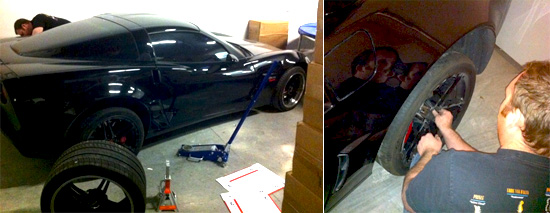
So yesterday I swung by work to help Jim swap his tires (the pictures below are his car, not mine). He’s got a set of Forgeline rims in the back and the leak. Not the tires- the rims. These particular rims are a three piece forged set and the leak is occurring where the pieces are bolted together. Yes sir, with this kind of performance even your rims need maintenance.

Anyway, I helped Jim swap his wheels off. Wheel swapping is pretty easy on most cars. Vettes with tires that are 12.5″ across and that weigh about 40 lbs are a little trickier. Just a quick set of instructions to help all you people who want to change their Vette tires (or any tires).

Items I recommend:
1. Car Jack (low profile)
2. Jack Pads
3. Torque wrench
4. Wrench extender (pictured in kit above- you may need this is your rims have deep lips).
5.  Wrench bit that fits your lugs (size will vary based on what wheel you have on your car).
5. Locking lug key (if applicable- sometimes nice wheels come with a special lug to deter theft).

Steps to remove / change tires:
1. Put your parking break on.
2. Underneath the car about to feet from the rear ties there is an oval hole. You can put your jack pad there or jack directly from this spot.
3. Carefully position your Jack and pump it up until it’s firmly in place, but don’t lift your car of the ground yet.
4. Loosen your lugs. Here’s a great article on wheel lug torquing, including how to loosen and tighten your lugs.
5. Jack the car up until the tire is off the ground. You can use a car jack stand if you can any concerns that your car might fall.
6. Finish loosening the lugs and remove them.
7. Firmly grip the tire and pull it off the vehicle (and remember, you can roll a tire- you don’t have to lift it to put it somewhere).
8. Give you rotor and brake calipers a little cleaning if you want
9. Lift on the new tire, light up the holes with the lug bolts, and refer to the torquing guide above again.
10. Remove you jack lift (if applicable), lower your car and repeat on the other side.
Remember: after you drive you car 50-100 miles you should tighten the lugs again!

Just in case you’re curious about why you’d be removing or changing tires, here a few good reasons:
1. You’ve got one set of street tires and one set of track tires and you need to switch them.
2. You’ve got a flat and you’re putting on a spare
3. Wheel maintenance (tire, rim, TPMS, etc).
4. Assembly maintenance (breaks, calipers, rotor, etc)
5. Left / Right tire rotation
6. Because you’ve got a sick idea of fun.

Anyway, now that the weather is a littler better (could we do something about these roads? They are awful!), batteries are charged and wheels are swapped maybe you’ll see us on the road again.


Posted Jan 30, 2011 by Cam Hughes